PcComponentes
Mon compte
producto
  • Adaptador KVM USB Crash Cart StarTech NOTECONS01 VGA Compatible Multi SOs Compacto
    • Adaptador KVM USB Crash Cart StarTech NOTECONS01 VGA Compatible Multi SOs Compacto
    • Adaptador KVM USB Crash Cart StarTech NOTECONS01 VGA Compatible Multi SOs Compacto
    • Adaptador KVM USB Crash Cart StarTech NOTECONS01 VGA Compatible Multi SOs Compacto
    • Adaptador KVM USB Crash Cart StarTech NOTECONS01 VGA Compatible Multi SOs Compacto
    • Adaptador KVM USB Crash Cart StarTech NOTECONS01 VGA Compatible Multi SOs Compacto
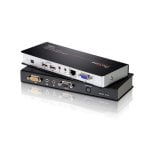
    • Adaptador KVM USB Crash Cart StarTech NOTECONS01 VGA Compatible Multi SOs Compacto
    • Adaptador KVM USB Crash Cart StarTech NOTECONS01 VGA Compatible Multi SOs Compacto
    chargement des images ...

    Adaptador KVM USB Crash Cart StarTech NOTECONS01 VGA Compatible Multi SOs Compacto
    3,2/5
    9 Avis
    P/N: NOTECONS01 | Cod. Article: 10958756
    537,78
    Vendu et expédié parInfopavon
    4,4/5
    11.177 évaluations
    537,78
    Articles similaires
    537,78
    Caractéristiques
    Avis9
    Questions et réponses0
    Comparés
    À propos du produit

    Simplifica el mantenimiento de servidores y equipos sin periféricos con el adaptador KVM USB Crash Cart StarTech NOTECONS01, llevando la gestión a cualquier sitio con máxima eficiencia.

    Características Adaptador KVM USB Crash Cart StarTech NOTECONS01

    Portabilidad total para técnicos IT y administradores. Convierte cualquier portátil en una potente consola KVM, permitiendo acceder y controlar servidores, PCs, ATMs o sistemas embebidos sin necesidad de monitores ni periféricos adicionales. Reduce drásticamente el peso y volumen de tu equipamiento: olvídate de acarrear una consola física o costosas soluciones rack.

    Acceso al instante a BIOS y POST. El adaptador permite gestionar configuraciones críticas gracias a la emulación de teclado y ratón por hardware, con control desde el arranque (pantallas POST). Esto resulta clave para la resolución in situ de incidencias y mantenimiento profesional, ahorrando tiempos de parada y desplazamientos innecesarios.

    Plug and play real: el dispositivo no requiere instalación de drivers ni software en el servidor objetivo. Compatible con arquitecturas USB 2.0, soporta tanto puertos PS/2 como USB para teclado y ratón. Su conexión alimentada por USB garantiza operatividad continua y máxima autonomía para tu portátil.

    Compatibilidad multiplataforma garantizada. Totalmente compatible con los principales sistemas operativos profesionales: Windows, macOS, y Linux. Su diseño compacto facilita el transporte en cualquier entorno profesional.

    Optimiza la administración IT y maximiza tu eficiencia operativa en centros de datos, laboratorios, empresas o despliegues remotos. Descubre cómo este adaptador KVM portátil puede transformar tu manera de trabajar y solucionar problemas complejos desde cualquier lugar. ¡Hazte con la herramienta indispensable para todo técnico experto!

    Especificaciones Adaptador KVM USB Crash Cart StarTech NOTECONS01

    EspecificaciónDetalle
    Peso170 g
    Tipo de conector 1USB Mini-B (hembra)
    Tipo de conector 2PS/2 + USB 2.0 A + VGA (macho)
    Compatibilidad SOWindows XP, Vista, 7, 8, 8.1, 10, 11; Windows Server; macOS 10.6+, Mac OS X Ventura; Linux 2.6.x+
    AlimentaciónUSB directa
    CertificacionesCE, RoHS
    ColorNegro
    Dimensiones del paquete300 x 45 x 160 mm
    Peso del paquete400 g
    Control de vídeoVGA
    Cumplimiento sostenibilidad
    Cantidad caja30 unidades

    FAQs - Adaptador KVM USB Crash Cart StarTech NOTECONS01

    ¿Para qué sirve un adaptador KVM Crash Cart como este modelo?
    Permite utilizar tu portátil como consola temporal para acceder a servidores, PCs o dispositivos industriales en rack u otros entornos donde no hay monitor, teclado ni ratón conectados, ideal para tareas de soporte, diagnóstico o configuración.

    ¿Se requiere instalar software o drivers en el servidor destino?
    No. La conexión es completamente plug and play. El adaptador emula directamente teclado, ratón y vídeo, funcionando desde antes del arranque del sistema operativo.

    ¿Es compatible con entornos Linux o Mac?
    Sí. Soporta sistemas Linux de kernel 2.6.x en adelante y versiones modernas de macOS/Mac OS X, además de equipos Windows, ofreciendo máxima flexibilidad en entornos mixtos.

    ¿Qué ventajas ofrece frente a consolas KVM tradicionales?
    Supone una solución mucho más portátil, económica y cómoda. No es necesario transportar hardware voluminoso ni depender de consolas fijas, y es perfecta para técnicos en movimiento, labores de campo o situaciones de urgencia IT.

    Sécurité du produit

    Avis

    3.2
    9 Avis
    100%
    On recommande9 Recommandations
    • 5
      2
    • 4
      1
    • 3
      3
    • 2
      3
    • 1
      0

    Donnez votre avis

    Cela vous prendra une minute, vous aiderez les gens à prendre une décision.

    Avis des utilisateurs

    Total 9 avis
    • Plus pertinents
    • Plus récents
    • Plus anciens

    En provenance d'autres pays

    g
    grumpquat
    Hace 7 años
    This expensive product used to work great with OS X and now it requires multiple restarts of the application with every session. It's barely functional now.
    Publié originalement sur Startech
    r
    rkhands
    Hace 7 años
    I have had this for several years, recently the video output is missing the color red. The VGA connector looks fine, no missing or pushed down pins.
    Publié originalement sur Startech
    Q
    QsterX
    Hace 12 años
    I have been planning on buying this since it was announced and only recently got to it. I have worked in the field for 15 years and consider this (conceptually) to be pretty much the most useful thing in a toolkit after a Phillips screwdriver. The device works really well, I have used it both under...
    Publié originalement sur Startech
    g
    gmolitor
    Hace 7 años
    Hello, the adapter worked very well whilst Windows 7 was installed on my Notebook. But since I've been migrated to Windows 10 the NoteCons01 Adapter isn't working properly anymore even I am using the latest driver software for this kind of the Adapter. So as soon as a Output Screen coming from the c...
    Publié originalement sur Startech
    E
    EdBartra
    Hace 8 años
    Overpriced, but handy if you don't have access to physical console crash carts and travel. Invest in cheap kvm cables to protect pins on this device as they will eventually get damaged from constant plugging and unplugging. App does not seem to support Mac OS High Sierra, but work in Sierra.
    Publié originalement sur Startech
    J
    JeffJeff
    Hace 6 años
    During the POST/Boot process, if the server is constantly changing video resolution, it usually throws garbage text at the screen or the screen freezes. I have to keep unplugging and plugging the USB cable until I get video signal again. I'm using Windows 10 (fresh install, no upgrade from Windows 7...
    Publié originalement sur Startech
    S
    SecEng1
    Hace 7 años
    Somewhere along the way this is no longer consistently working for my iOS devices. I am not sure if its the iOS upgrades or the unit is failing but finding help is not a trivial task. When I originally got this years ago it was pretty solid but no longer the case.
    Publié originalement sur Startech
    S
    Sigtran
    Hace 4 años
    Simply essential tool. No need for screen and keyboard anymore, just plug into any server and access it. Do need a HDMI convertor
    Publié originalement sur Startech
    I
    ITman
    Avis le plus utile
    Hace 8 años
    I love this adapter, but would like to see better copy and paste options.
    Publié originalement sur Startech
    Avis vérifié
    Notre label « avis vérifié » garantit que cet avis appartient à l'utilisateur qui a acheté le produit sur notre site web. Nous vérifions l'authenticité des achats et des avis correspondants afin de garantir que les avis ainsi étiquetés sont exacts et fiables.

    Questions et réponses

    Il n'y aucune question pour le moment. Soyez le premier !