PcComponentes
Mon compte
producto
  • Clavier Logitech MX Keypad programmable 9 touches LCD profils IDE Graphite
    • Clavier Logitech MX Keypad programmable 9 touches LCD profils IDE Graphite
  • Clavier Logitech MX Keypad programmable 9 touches LCD profils IDE Graphite
  • Clavier Logitech MX Keypad programmable 9 touches LCD profils IDE Graphite
  • Clavier Logitech MX Keypad programmable 9 touches LCD profils IDE Graphite
  • Clavier Logitech MX Keypad programmable 9 touches LCD profils IDE Graphite
  • Clavier Logitech MX Keypad programmable 9 touches LCD profils IDE Graphite
  • Clavier Logitech MX Keypad programmable 9 touches LCD profils IDE Graphite
  • Clavier Logitech MX Keypad programmable 9 touches LCD profils IDE Graphite
  • Clavier Logitech MX Keypad programmable 9 touches LCD profils IDE Graphite
  • Clavier Logitech MX Keypad programmable 9 touches LCD profils IDE Graphite
chargement des images ...
P/N: 920-013891 | Cod. Article: 11171683

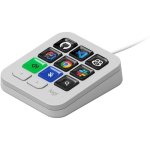
Clavier Logitech MX Keypad programmable 9 touches LCD profils IDE Graphite

4,8/5
17 Avis
99,99
P/N: 920-013891 | Cod. Article: 11171683
Le plus remarquable
  • Pavé de macros programmable avec 9 touches LCD
  • Profils intelligents pour IDE et applications
  • Compatible Windows 10+ et macOS 13+
  • Personnalisation via Logi Options+
  • Automatisation des tâches répétitives
  • Design compact et léger avec support ergonomique
99,99
Garantie de solution en 24h
Gratuit
Articles similaires
99,99
Caractéristiques
Avis17
Questions et réponses0
Comparés
À propos du produit
Ce dispositif est fourni sans adaptateur secteur, conformément à la Directive Européenne 2022/2380. Vous pouvez l'acheter séparément.

Optimisez votre productivité avec le Clavier Logitech MX Keypad, un pavé de macros programmable conçu pour les développeurs exigeants.

Caractéristiques Clavier Logitech MX Keypad

Le MX Keypad offre une interface intuitive avec 9 touches LCD personnalisables, idéales pour accéder instantanément à des commandes complexes, scripts et macros. Grâce à ses profils intelligents détectant automatiquement l'application active, il adapte ses fonctions pour VS Code, IntelliJ, GitHub Copilot et bien d'autres, réduisant ainsi les interruptions et améliorant la concentration. Sa compatibilité USB-C et multi-plateforme (Windows 10+ et macOS 13+) garantit une intégration fluide dans tout environnement de travail. La personnalisation par glisser-déposer permet de créer des macros, d'organiser des profils multi-pages et d'exploiter la bibliothèque Logi Marketplace pour étendre ses fonctionnalités. Ce pavé est un allié puissant pour automatiser les tâches répétitives, accélérer la navigation dans le code et intégrer l'intelligence artificielle directement via des raccourcis dédiés. Son design compact et léger, accompagné d'un support ergonomique, assure un confort optimal lors de longues sessions de programmation. Le MX Keypad est ainsi l'outil parfait pour les développeurs full-stack et ingénieurs logiciels cherchant à maximiser leur efficacité et fluidité de travail.

Spécifications Clavier Logitech MX Keypad

SpécificationDétail
Nombre de touches9 touches LCD personnalisables
ConnectivitéUSB-C 2.0
CompatibilitéWindows 10 ou ultérieur, macOS 13 ou ultérieur
Dimensions (pavé)91,7 x 77,9 x 25,5 mm
Poids (pavé)96 g
Support inclusDimensions: 112,7 x 58,5 x 20,5 mm, poids: 61 g
Longueur câble1500 mm
LogicielLogi Options+ (Windows/macOS)
Garantie2 ans limitée

FAQs - Clavier Logitech MX Keypad

À quoi sert le MX Keypad ?
Il permet d'automatiser et d'accéder rapidement à des commandes complexes, macros et scripts, optimisant ainsi le flux de travail des développeurs.

Comment personnaliser les touches ?
Via une interface intuitive par glisser-déposer dans l'application Logi Options+, vous pouvez créer des profils, macros et raccourcis adaptés à vos besoins.

Est-il compatible avec tous les systèmes ?
Oui, il fonctionne parfaitement sous Windows 10 et versions ultérieures ainsi que macOS 13 et versions ultérieures.

Quels avantages offre la détection de contexte ?
Les touches s'adaptent automatiquement à l'application active, réduisant les interruptions et améliorant la productivité.

Sécurité du produit

Avis

4.8
17 Avis
100%
On recommande17 Recommandations
  • 5
    14
  • 4
    3
  • 3
    0
  • 2
    0
  • 1
    0

Donnez votre avis

Cela vous prendra une minute, vous aiderez les gens à prendre une décision.

Avis des utilisateurs

Total 17 avis

En provenance d'autres pays

S
SteffenK
Il y a 8 jours
Eine Klasse Unterstützung für Entwickler und Anwender [Diese Bewertung wurde im Rahmen einer Sonderaktion abgegeben.] Das Logitech MX Keypad ist ein Steuerungs Hub, mit dem man sofortigen Zugriff auf Apsp, Dokumente und komplexe Befehle sofort ausführen kann. Die 9 anpassbaren LCD Tasten lassen si...
Publié originalement sur Logitech-de
m
ms_hijabi_7022
Il y a 5 jours
Recommend [This review was collected as part of a promotion.] Absolutely love this MX Keypad by Logitech, for someone who mainly works from home, this is so convenient, it’s really easy to use. This literally took me 5 minutes to connect and set up, you can customise the keypad to whatever shortcu...
Publié originalement sur Logitech-emea
S
SzymonS
Il y a 11 jours
Versatility in a small and smart looking package [This review was collected as part of a promotion.] Versitale product that can be used for simply navigating your pc system, used for creative tasks like video editing in davinci resolve or you can create custom shortcuts for anything you want. Real...
Publié originalement sur Logitech-emea
A
AshleighP
Il y a 12 jours
Amazing bit of kit! [This review was collected as part of a promotion.] What a fantastic product to have on my desk! This MX Keypad looks stylish and sleek in my home office setup and sits naturally next to my keyboard and laptop with connected screens. I love the fact it is completely customisabl...
Publié originalement sur Logitech-emea
J
JasmineY
Il y a 13 jours
Usefull [This review was collected as part of a promotion.] I have only recently started using it but so far I am really happy with it.The design is simple and stylish and I really like the graphite colour.The keys feel nice to press.
Publié originalement sur Logitech-emea
S
SundasM
Il y a 6 jours
Must have [This review was collected as part of a promotion.] Very easy to setup and use easy to connect with the key board and i relaly liek the deatires easy to use and its cery intelligent device as it really make our moves wotk very quickly instead of open the whole files easy to use aetu...
Publié originalement sur Logitech-emea
A
ArpitM
Il y a 7 jours
Premium customisable keypad that puts your favourite shortcuts at your fingertips and makes every day workflows quicker [This review was collected as part of a promotion.] I have recently started using the Logitech MX keypad and my first impression is very positive. Set was straightforward and I r...
Publié originalement sur Logitech-emea
A
AlinaR
Il y a 7 jours
Perfect little help [This review was collected as part of a promotion.] Feels like Christmas when i receive a new toy to help me out. Light and small with an amazing technology that help save time and facilitate the computer work
Publié originalement sur Logitech-emea
A
ArpitM
Avis le plus utile
Il y a 7 jours
Premium customisable keypad that puts your favourite shortcuts at your fingertips and makes every day workflows quicker [This review was collected as part of a promotion.] I have recently started using the Logitech MX keypad and my first impression is very positive. Set was straightforward and I r...
Publié originalement sur Logitech-emea
m
ms_hijabi_7022
Il y a 5 jours
Recommend [This review was collected as part of a promotion.] Absolutely love this MX Keypad by Logitech, for someone who mainly works from home, this is so convenient, it’s really easy to use. This literally took me 5 minutes to connect and set up, you can customise the keypad to whatever shortcu...
Publié originalement sur Logitech-emea
S
SzymonS
Il y a 11 jours
Versatility in a small and smart looking package [This review was collected as part of a promotion.] Versitale product that can be used for simply navigating your pc system, used for creative tasks like video editing in davinci resolve or you can create custom shortcuts for anything you want. Real...
Publié originalement sur Logitech-emea
A
AlinaR
Il y a 7 jours
Perfect little help [This review was collected as part of a promotion.] Feels like Christmas when i receive a new toy to help me out. Light and small with an amazing technology that help save time and facilitate the computer work
Publié originalement sur Logitech-emea
S
SundasM
Il y a 6 jours
Must have [This review was collected as part of a promotion.] Very easy to setup and use easy to connect with the key board and i relaly liek the deatires easy to use and its cery intelligent device as it really make our moves wotk very quickly instead of open the whole files easy to use aetu...
Publié originalement sur Logitech-emea
A
AshleighP
Il y a 12 jours
Amazing bit of kit! [This review was collected as part of a promotion.] What a fantastic product to have on my desk! This MX Keypad looks stylish and sleek in my home office setup and sits naturally next to my keyboard and laptop with connected screens. I love the fact it is completely customisabl...
Publié originalement sur Logitech-emea
J
JasmineY
Il y a 13 jours
Usefull [This review was collected as part of a promotion.] I have only recently started using it but so far I am really happy with it.The design is simple and stylish and I really like the graphite colour.The keys feel nice to press.
Publié originalement sur Logitech-emea
Avis vérifié
Notre label « avis vérifié » garantit que cet avis appartient à l'utilisateur qui a acheté le produit sur notre site web. Nous vérifions l'authenticité des achats et des avis correspondants afin de garantir que les avis ainsi étiquetés sont exacts et fiables.
Charger plus d'avis

Questions et réponses

Il n'y aucune question pour le moment. Soyez le premier !